Computing Sources of Information
A very good source of computing information is Pheonixnap Knowledge Base
What a truly massive subject
A very good source of computing information is Pheonixnap Knowledge Base
The MacBook Pro models currently use Apple's ARM architecture, specifically the M1 and M2 chips, rather than AMD64 architecture. Older MacBook Pro models used Intel processors, which are based on the AMD64 architecture.
The processor in our mac is ---- 2.2 GHz Quad-Core Intel Core i7
I have created a script which launches and starts this webserver after logon.
To check see if the Apache server is running do the following:
Hold the command key down and tap on the tab key repeatedly until you get to the elephant.
Alternatively move the mouse pointer down to the bottom of the screen which will display the dock. On the dock you should see the elephant - click on it. Actually this is the best method because if MAMP is not running then clicking the elephant on the dock will launch MAMP and start Apache. It will then open a page in the browser but you can then click the elephant on the dock again to bring it to the front.
Observe the MAMP window and see that the Apache radio button is checked and that the start/stop button is showing stop
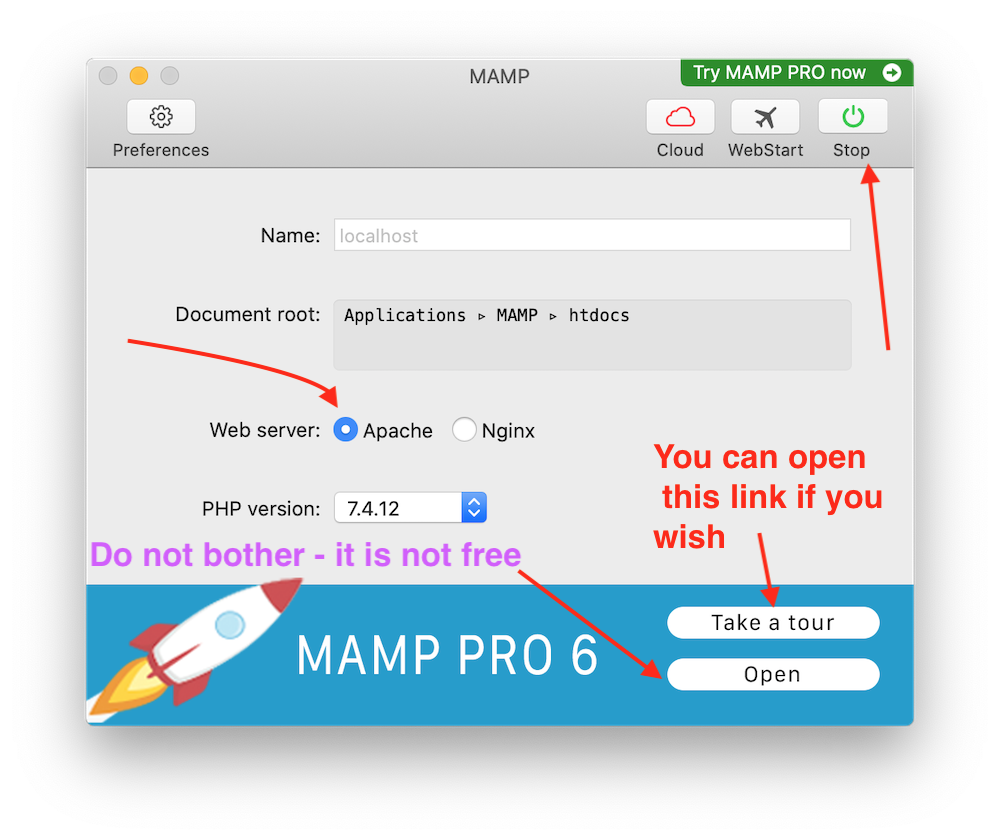
Note that I use the free version of MAMP. The links mentioning the pro version are for a paid for application.
The name MAMP is an acronym that stems from the names of the components of the system:[1] macOS (the operating system); [2] Apache (the web server); [3] MySQL or MariaDB (the database management system); and [4] PHP, Perl, or Python (programming languages used for web development). The name is derived from LAMP, a similar stack of all open-source software widely used for websites, but substituting the proprietary macOS for the open-source Linux OS.
I am working on our website and therefore topics covered will be HTML, CSS, JavaScript and Java.
I hope to eventually link my databases to the website and therefore the topic of MySQL will be amongst these pages.
Install the Apache webserver (see Debian page LAMP install instructions).
I have downloaded an installer for Debian (yes I know it is not Ubuntu but it is Linux based). I have put a link for install instructions in the Linux folder of Bookmarks of Firefox.
MAMP is your free local server environment with Apache, Nginx, PHP, and MySQL. It runs on macOS and Windows.
MAMP website for Windows and MacOS. See the Debian link for details of LAMP.
Handbrake is a program for converting video files to another format. This is a link to a user guide.
I have this metadata reader by Phil Harvey in both a GUI version and a command line version.
A user guide can be consulted at this site.
Brackets is a CSS, HTML and JavaScript editor.
Brackets is cross-platform, available for macOS, Windows, and most Linux distributions. The main purpose of Brackets is its live HTML, CSS and JavaScript editing functionality
A user guide can be consulted at this site.
Xcode is a suite of developer tools for building apps on Apple devices. It includes an integrated development environment of the same name for macOS, used to develop software for macOS, iOS, iPadOS, watchOS, tvOS, and visionOS.
Xcode 12 is the latest version compatible with Catalina. I have found a tutorial for Xcode 12 on kodeco.com.
OnyX is a multifunction utility that you can use to verify the structure of the system files; perform cleaning and computer maintenance tasks; configure parameters in the Finder, Dock, Safari, and some Apple applications; delete caches; remove certain problematic folders and files; rebuild various databases and indexes; and more. It is a reliable application that provides a clean interface to many tasks that would otherwise require complex commands to be typed using a command–line interface.
This is the link to the author's webpages.I have not yet used this software.
Helps you read books anywhere, convert kindle, kobo, Google Play books to pdf, epub, azw3 and more formats.
balenaEtcher is a free and open source tool that works on Windows, Linux and Mac to flash any OS to any device.
I use this program to create bootable media on USB sticks or SD cards. Here is a link to more information.
Blender is the free and open-source 3D creation suite. It supports the entirety of the 3D pipeline: modeling, rigging, animation, simulation, rendering, compositing, motion tracking and video editing. Blender provides a consistent experience across Linux, macOS, and Windows operating systems via OpenGL.
I cannot remember ever using this program. Link to Blender user manual.
The purpose of Natron is to process video images using elementary “effect” bricks called nodes. The Natron user guide.
Discovery is a utility that displays all the Bonjour services on your local network or on Wide-Area Bonjour domains. Author's website
Apple Bonjour is a zero-configuration networking service that enables devices to discover each other on a local network using mDNS. It simplifies network setup for printers, cameras, and other peripherals without manual configuration, but may be unnecessary for users who don’t need device discovery features. GeekChamp - what is the bonjour service?
Kodi is an open source media centre software that can play a wide variety of music and video formats in addition to viewing Live TV and using add-ons (plugins) to further enhance your Kodi.
Universal Media Server is an open-source DLNA-compliant UPnP media server that facilitates streaming videos, music, and photos to a multitude of devices over HTTP/S.
A video editor that i have installed on Debian. A MacOS version is also available.
This is an open-source VPN. I have not yet installed it. There are versions for Ubuntu and for MacOS.
I have moved the folder myJava to the volume part79GB. This folder contains the source code from any Java books that I have been reading and also any source code that I have written myself in Java.
See w3schools pages on packages. Image below is example of using the textio package written by David Eck and used in interest3.java of chapter 3 of his book.
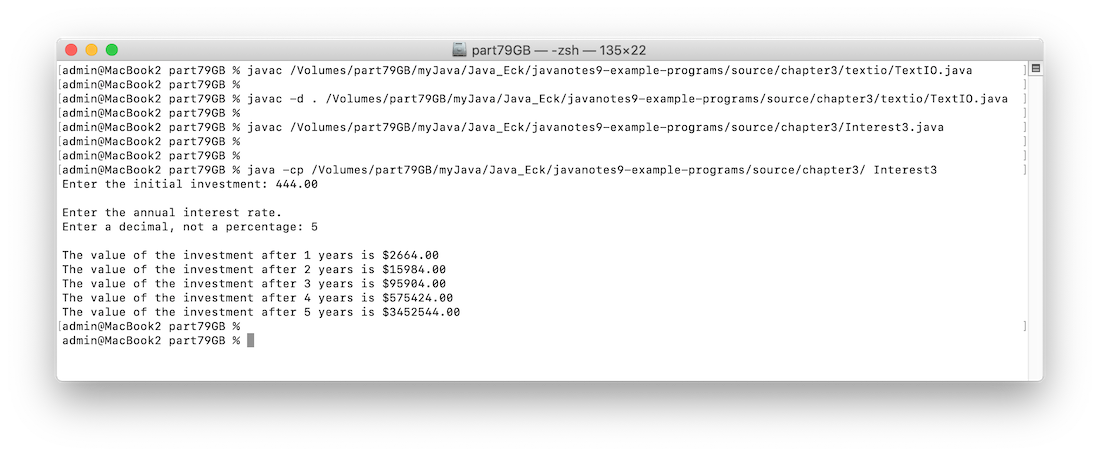
As at Wednesday 11 February 2026 the I am using java version "16.0.2" 2021-07-20 on macOS Catalina.
When the current directory is the same as the location of the .class files the all is well. But if current directory is any other then the message reported is Error: Could not find or load main class
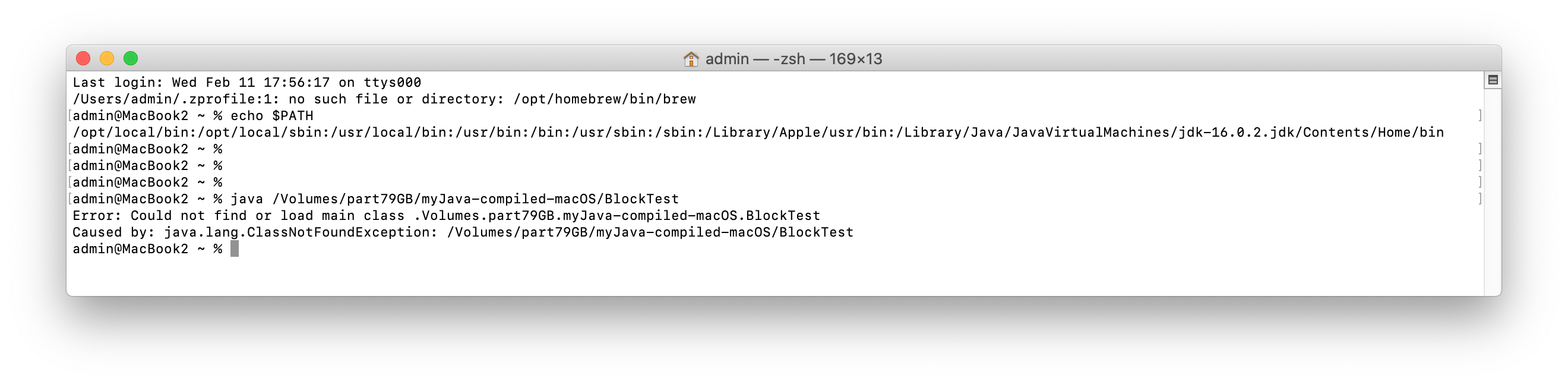
I have now set the $PATH see above image. But still getting the error..
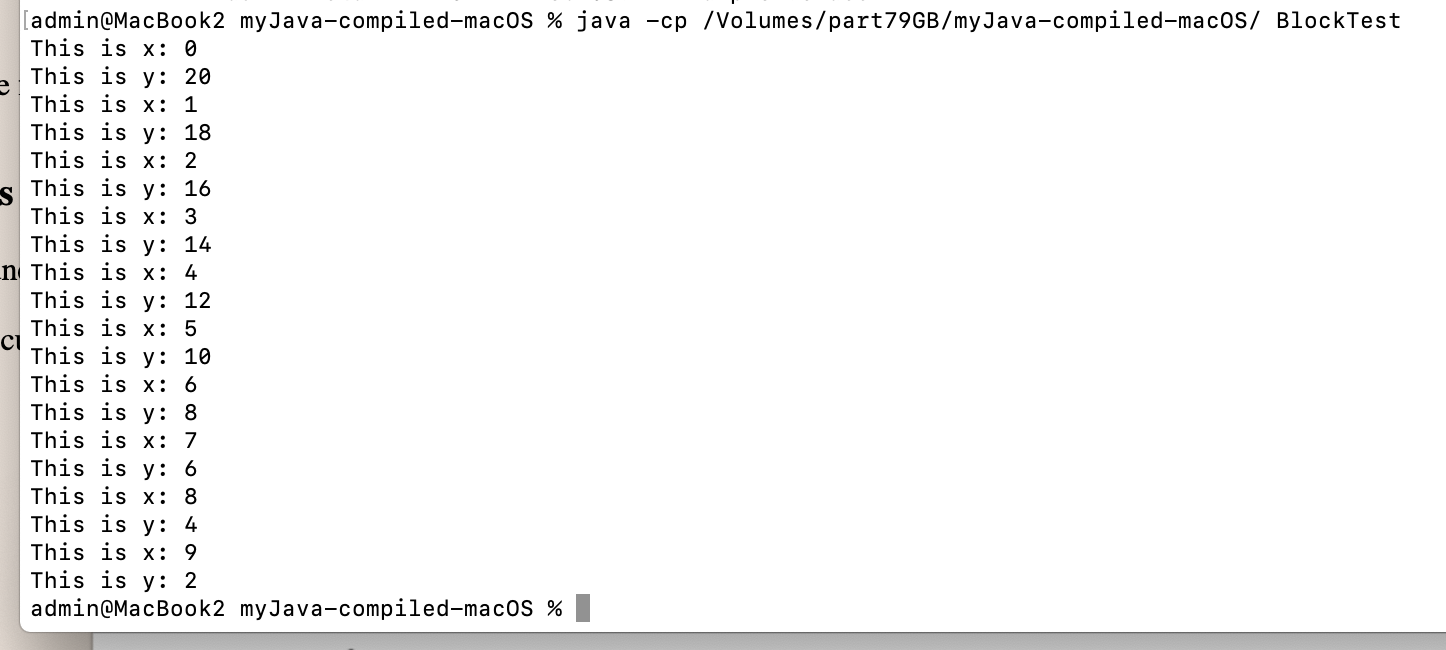
To avoid this error message run the java command as shown in image below. Use the class path option and make the first argument the path to the .class file and make the second argument the filename excluding the .class extension.
I have downloaded (on MacOS) a DMG for Java SE 25 JDK install instructions page
I have downloaded (on MacOS) several jdk versions so that i can upgrade 1 step at a time
In the downloads folder of Debian I have downloaded BlueJ which is a multi-platform IDE for Java development.
(also available for MacOS). I need to look up how to install it.
This is how to run the java compiled files:-
andrew@macbookpro2015:~$ java -cp /media/andrew/part79GB/myJava-compiled-macOS/ Divide
15.0 divided by 6.0
Result Remainder
2.5 3.0
andrew@macbookpro2015:~$
It seems that I have installed only the JRE and not the JDK which is why I have no javac command.
The site that I used for guidance is linux_x64_install on java.com
The following copy of a terminal session shows where my JRE is and that there is a Welcome html in the folder which I have copied to part79GB
andrew@macbookpro2015:/usr/local/java/jre1.8.0_481$ ls
bin COPYRIGHT legal lib LICENSE man plugin README release THIRDPARTYLICENSEREADME.txt Welcome.html
andrew@macbookpro2015:/usr/local/java/jre1.8.0_481$ cp Welcome.html /media/andrew/part79GB
andrew@macbookpro2015:/usr/local/java/jre1.8.0_481$
andrew@macbookpro2015:/usr/local/java/jre1.8.0_481$ cat README
Please refer to http://java.com/licensereadme
andrew@macbookpro2015:/usr/local/java/jre1.8.0_481$
andrew@macbookpro2015:/usr/local/java/jre1.8.0_481$ ls bin
ControlPanel java javaws jcontrol jjs keytool orbd pack200 policytool rmid rmiregistry servertool tnameserv unpack200
andrew@macbookpro2015:/usr/local/java/jre1.8.0_481$
The Java SE that I have installed JDK 25 Documentation (installed 13 February 2026)
I tried using the instructions to install JDK on openjdk.org but see error below.
andrew@macbookpro2015:~$ sudo apt-get install openjdk-8-jdk
Reading package lists... Done
Building dependency tree... Done
Reading state information... Done
E: Unable to locate package openjdk-8-jdk
I then followed these Oracle.com jdk install instructions - linux
I downloaded the .deb jdk install file from www.oracle.com/java/technologies/downloads/
I followed these instructions docs.oracle.com/en/java/javase/11/install/installation-jdk-linux-platforms
At the terminal I ran this command $ sudo dpkg -i jdk-25_linux-x64_bin.deb
The Java Development Kit files are installed into /usr/lib/jvm/jdk-25.0.2-oracle-x64 directory.
Editing ~/.profile I have ammended the SPATH as shown below. Note that after editing the path it is necessary to logout and login for the changes to take effect.
andrew@macbookpro2015:~$ echo $PATH
/usr/local/bin:/usr/bin:/bin:/usr/local/games:/usr/games:/usr/lib/jvm/jdk-25.0.2-oracle-x64/bin
andrew@macbookpro2015:~$
andrew@macbookpro2015:~$ java -version
java version "25.0.2" 2026-01-20 LTS
Java(TM) SE Runtime Environment (build 25.0.2+10-LTS-69)
Java HotSpot(TM) 64-Bit Server VM (build 25.0.2+10-LTS-69, mixed mode, sharing)
andrew@macbookpro2015:~$ javac
Usage: javac <options> <source files>
where possible options include:
This site helped with Setting the Java Home Directory on Linux
This entailed editing the ~/.bashrc file and adding this line to the end of the file
export JAVA_HOME='/usr/lib/jvm/jdk-25.0.2-oracle-x64'
This stackoverflow post is useful
I am reading a book called Java The Complete Reference 13th edition by Herbert Schildt and Dr. Danny Coward. The code for the 12th edition I downloaded and stored at Documents/Computing/myJava/Schildt.
Java Exercises - Basic to Advanced Java Practice Programs with Solutions on geeksforgeekk.org
https://math.hws.edu/javanotes/index.html book by David J Eck
Read this book on the iPad with Simple PDF Java book by Eck.
Other books and resources by David Eck
Programming exercise for chapter 2.