This page is for reminders of how to do things on the command line.
Books
-
A bash book on the gnu site bash manual - unkown author.
-
Bash Guide for Beginners by Machtelt Garrels. I have stored this eBook in the Books folder on MacOS and imported it into the Books App
-
The Linux Command Line - I have downloaded the PDF and stored it on part79GB
This book is by William Shotts. I started reading in approximately 2024. The source code for this book I downloaded from it-ebooks.dev. It is stored on part79GB.
I have actually got a PDF copy of The-Linux-Command-Line.pdf book here on the website.
Links
tldp.org Linux Commands This is a PDF and therefore could put it on iPad for reading.
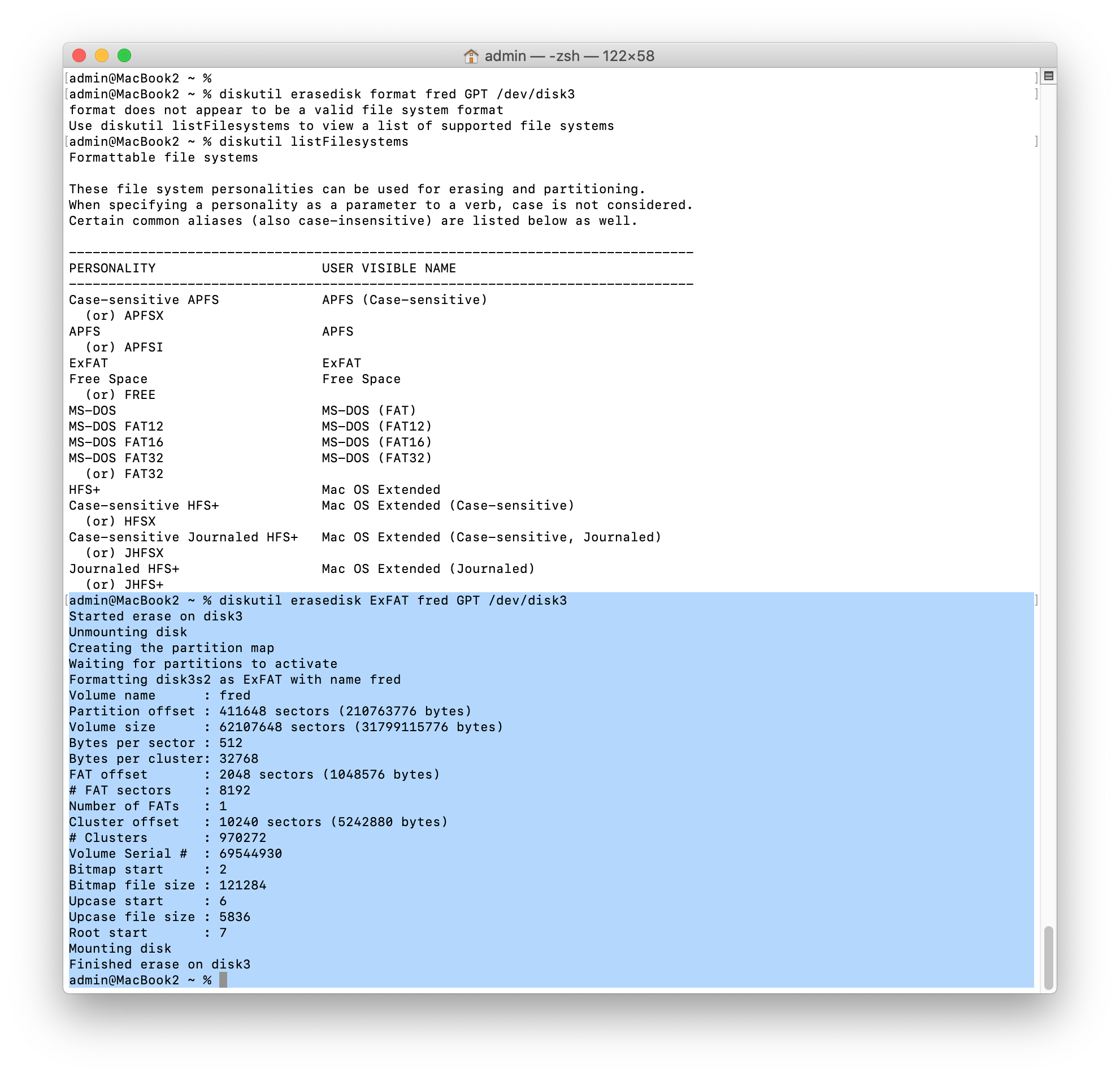
When an SDcard is not recognised by the laptop
The image below shows the command to use to fix the problem.
I must look into what these Hit and Get lines mean.
andrew@macbookpro2015:~$ sudo apt update

                Hit:1 http://security.debian.org/debian-security trixie-security InRelease

                Get:2 http://deb.debian.org/debian trixie InRelease [140 kB]

                Get:3 http://deb.debian.org/debian trixie-updates InRelease [47.3 kB]

                Get:4 http://deb.debian.org/debian trixie-backports InRelease [54.0 kB]

                Get:5 http://deb.debian.org/debian trixie-backports/main Sources.diff/Index [63.3 kB]

                Get:6 http://deb.debian.org/debian trixie-backports/main Sources T-2026-02-02-0159.44-F-2026-02-02-0159.44.pdiff [1,065 B]

                Get:6 http://deb.debian.org/debian trixie-backports/main Sources T-2026-02-02-0159.44-F-2026-02-02-0159.44.pdiff [1,065 B]

                Fetched 306 kB in 0s (1,260 kB/s)

                4 packages can be upgraded. Run 'apt list --upgradable' to see them.

                andrew@macbookpro2015:~$

                andrew@macbookpro2015:~$ sudo apt list --upgradable

                gimp-data/stable-security 3.0.4-3+deb13u5 all [upgradable from: 3.0.4-3+deb13u4]

                gimp/stable-security 3.0.4-3+deb13u5 amd64 [upgradable from: 3.0.4-3+deb13u4]

                gir1.2-gimp-3.0/stable-security 3.0.4-3+deb13u5 amd64 [upgradable from: 3.0.4-3+deb13u4]

                libgimp-3.0-0/stable-security 3.0.4-3+deb13u5 amd64 [upgradable from: 3.0.4-3+deb13u4]

                andrew@macbookpro2015:~$
Disks
Mounting a partition info at this link dos2unix post on linux forum.